|
Dragon Direct
 Quick Links Quick Links
Overview
Versions
Microphone Considerations
Sources of Additional Information
Quick Overview
Dragon Medical 360 Direct (Dragon Direct) may represent the biggest innovation in speech recognition since a dedicated medical product first became available. While currently available only for institutional purchase and somewhat limited in certain functions compared to the Medical Practice Edition, cloud-based application works with a speed similar to the full client-side version and with an accuracy that exceeds existing all current products. For all of these reasons, we suggest that you get to know the product by exploring this page and associated links. If your institution has already adopted Dragon Direct, we hope this site will serve as a source of useful information. Be sure to review the links at the bottom of this page, including our full product guide.
What it Does: For those new to speech recognition technology, these are the basic functions Dragon Direct can accomplish:
- Convert your words into text
- Use your voice to insert chunks of pre-defined text
- Use your voice to select, correct and format text
- Use your voice to navigate from place to place on a document with pre-defined “navigation fields”
- Use your voice to accomplish a variety of tasks on your computer, including opening documents, applications and web pages, controlling the microphone, pressing keyboards keys, entering text, and doing any of the above in a sequential way.
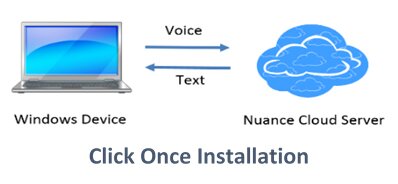
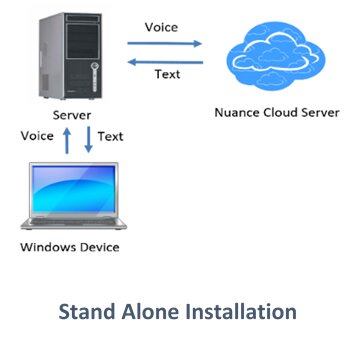
Unique to this product is that the application itself is a very small (about 30 MB) application that serves primarily to compress your voice signal and send it to a cloud-based server where a powerful computer does all the work and then send the text or instructions back to your local machine. A key requirement, therefore, is a good Internet connection.
What it Doesn't Do: For those accustomed to using the full versions of Dragon installed on your computer, you should know that Dragon Direct is a somewhat pared down version of Dragon and does not include many of the advanced functionalities seen in the full version of Dragon NaturallySpeaking. Among the things that it cannot do are the following:
- Accept speech from a digital recorder, mobile phone or Bluetooth microphone
- Allow import or export of commands for sharing on the user level (but this can happen centrally)
- Allow use of formatted text in text commands
The above notwithstanding, Dragon Direct accomplishes extremely well those functions which are most essential. The application truly shines in its speed, accuracy, and simplicity.
What you Can Expect: Based on the principles and technology used in the product familiar to users of mobile devices, this new product is intended for use on a windows computer and includes a variety of medical vocabularies and features not seen in the mobile device product. Key features of this product include the following:
- Highly level of accuracy (better than seen with traditional version of NaturallySpeaking)
- Speed almost identical to that seen in the full Dragon NaturallySpeaking client-side software
- Lack of need for user training
- Automatic adjustment for user accent
- Automatic integration with a variety of microphones including the PowerMic II, Philips SpeechMike Premium, and others
- Automatic microphone gain adjustment
- Availability of versions for use with applications on both a local computer and for virtualized (Citrix based) applications
- Advanced features including use of text commands (termed “Auto Text”) and a simplified method of creating step-by-step commands for computer control
- Full text control to allow navigation, selection, and correction of text
- Unique ability to anchor upon a document and place dictated text in this document even when computer focus has changed
Two Versions
Depending upon whether you are using Dragon Direct for an application residing on your local machine or an EMR on a distant server, you may use it in one of two configurations
| |
Click Once Installation Local Version: formally called the “Click-once” version, this is for installations in which the application is installed directly on the user’s computer and the application is launched and used locally. Type of set up is simple and is best suited for situations in which the target text entry Window arises from an application actually running on the computer and not being presented virtually with Citrix or a remote desktop technology
|
|
Stand Alone Installation Server Version: formally called the “Stand-alone” version, in this scenario, the application is installed centrally in a server and is accessed by users by means of Citrix or another virtual methodology. This arrangement is used if an electronic medical record is presented virtually to a user and in this scenario the application is placed directly on the Citrix server and not on the local computer. Although the logistics are different, from the user’s perspective operation is exactly the same.
|
|
| |
 |
|
 |
|
Microphone Considerations
Having extensively tested both the local and server version of Dragon Direct at Dartmouth Hitchcock, we have learned a few things about optimizing use and efficiency. While the application will work with any sound system, there are important benefits that result from use of a hand-held microphone such as the PowerMic II or Philips SpeechMike Premium. Specific benefits include the following:
- Use of a hand-held microphone allows control of the Dragon Direct microphone with a push-button (either in a push-to-talk or push-on/push-off method. In so doing, the user never needs to chance losing "focus" from the active application as may occur with other control methods
- A hand-held USB microphone allows programming of a key to facilitate rapid movement through "navigation fields" in a note template, promoting productivity
- Hand-held microphones are considered convenient by most medical providers in that they do not require the microphone to be repeatedly mounted and removed throughout the day
- The PowerMic II and and SpeechMike Premium are both highly accurate and noise canceling, making the suitable for use in the often loud environment of a hospital ward or clinic.
- Nuance has designed Dragon Dictate to employ direct integration for both of the hand-held USB microphones; as a result it is a simple process to program four buttons on each of the microphones to accomplish a variety of functions when used with Dragon direct. Specific programmable functions which can be assigned to keys on these microphones include:
- Transfer text (from "Dictation Box")
- Clear Dictation Box
- Anchor/Release speech focus
- Recall Text
- Show/Hide DragonBar
- Show/Hide Dictation Box
- Next Field
- Previous Field
- Press Hotkey (allows you to assign a key or key combination to a button push – useful in emulating a key combination used to navigate in many EMRs)
- Assign the central "Record" button on each of these mics to control the microphone in either a Push-to-Talk or Push On - Push Off method.
Philips SpeechMike Premium
 This is the newest entry to the hand-held USB microphone market, our personal favorite, and huge leap in technology by Philips. Made for the demanding work-flows and requirement of the professional , this product combines the best of design, ergonomics, and functionality. Unique to this microphone is a suspended electret condenser microphone element which is "decoupled" from the housing to offer both unprecedented accuracy, but also immunity from background noise, touch, and click noises. In addition it includes a functionality that automatically senses when the microphone is set down and mutes the microphone element. It comfortable in the hand, durable, and includes a one-year warranty. We prefer this microphone over the PowerMic due to it's added functionality, warranty and significantly lower price. This is the newest entry to the hand-held USB microphone market, our personal favorite, and huge leap in technology by Philips. Made for the demanding work-flows and requirement of the professional , this product combines the best of design, ergonomics, and functionality. Unique to this microphone is a suspended electret condenser microphone element which is "decoupled" from the housing to offer both unprecedented accuracy, but also immunity from background noise, touch, and click noises. In addition it includes a functionality that automatically senses when the microphone is set down and mutes the microphone element. It comfortable in the hand, durable, and includes a one-year warranty. We prefer this microphone over the PowerMic due to it's added functionality, warranty and significantly lower price.
Usual Price: $335
Click here to learn more about the Philips SpeechMike Premium (LFH 3500)
Nuance PowerMic II
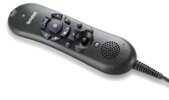 The PowerMic II is a long-time favorite of medical providers, more than anything because it has long benefited from unique integration with medical versions of Dragon. Although this is equal to the SpeechMike Premium in terms of integration with Dragon Direct, it offers the benefit of an embedded microphone element which is particularly immune to contaminating noise. The PowerMic II comes with only a 90-day warranty but is ruggedly manufactured. The PowerMic II is a long-time favorite of medical providers, more than anything because it has long benefited from unique integration with medical versions of Dragon. Although this is equal to the SpeechMike Premium in terms of integration with Dragon Direct, it offers the benefit of an embedded microphone element which is particularly immune to contaminating noise. The PowerMic II comes with only a 90-day warranty but is ruggedly manufactured.
Usual Price $424
Click here to learn more about the PowerMic II
Additional Information
For those considering Dragon Direct or for those with access to the application but wanting additional information, we are happy to provide the information below.
| |
Speech Recognition Solutions "Unofficial Dragon Direct User Guide. This is our own guide to Dragon Direct and based on our use of both the server-based and local version of the application at Dartmouth-Hitchcock Medical Center. |
|
Nuance on-line Dragon Direct User Guide. While not quite as extensive as our own guide, this is a great source of information for new users of Dragon Direct. |
|
| |
Dragon Direct Installation Guide Although not likely to be useful to most users, this is a link to the formal Nuance Dragon Direct installation guide and is packed with potentially useful information. |
|
Brief User Guide - this is a brief, 2-page guide put together for users at Dartmouth-Hitchcock |
|
| |
Nuance University Dragon Direct Training Course This is Nuance's main training guide for Dragon Direct and a simple to follow and fairly comprehensive guide to the Application |
|
Nuance Dragon Direct Quick Reference Guide This is a short but concise one-page reference guide provided by Nuance.
|
|
|